Don't worry! The contents here will appear on the published page.
SaaS Chart of Accounts: Complete Template & Setup Guide (2026)

Woosung Chun
CFO, DualEntry
Woosung Chun
CFO, DualEntry
Woosung Chun is the CFO of DualEntry with experience in corporate finance, accounting, strategy, and acquisitions. He previously grew from scratch and led the M&A and Finance teams at Benitago, where he completed more than 12 acquisitions in 2 years. He graduated with a BS from NYU Stern. At DualEntry, Woosung writes about AI in accounting, revenue recognition, foreign currency accounting, hedge accounting, and ERP modernization for finance teams navigating complex, multi-entity environments.
Learn about our editorial policies.
Last updated
September 2, 2026
Reviewed by
Do San (Justin) Myung

Do San (Justin) Myung
Expert Accountant & Former Consulting CFO | DualEntry
Justin (Do San Myung) is Expert Accountant at DualEntry with 20+ years of hands-on experience managing general ledgers, financial close processes, and ERP implementations for mid-market and enterprise companies. As a former Consulting CFO and Controller, he has personally overseen month-end closes, SOX compliance programs, and multi-entity consolidations across technology, manufacturing, and services industries. Justin specializes in transforming manual accounting workflows into automated, AI-driven processes.
Learn about our editorial policies.

Summarize this article
Most SaaS founders start with the default chart of accounts in QuickBooks or Xero. A sensible starting point – but not a future-proof one. As your business grows, investors and auditors will ask for a proper P&L with SaaS gross margins, and this is where starter setups fall flat.
A common misconception is that the SaaS chart of accounts is just a longer version of the standard template. In reality, it's a different structure, built around subscription revenue, deferred revenue, and a COGS definition that produces a meaningful gross margin. Get it wrong and reporting – from investor updates to board decks to audit prep – gets harder.
This guide includes a complete SaaS chart of accounts template with account numbers, plus an explanation of what makes each account SaaS-specific and when to add it. Copy it, adapt it to your business’ growth stage, and skip the rebuild later.
What is a chart of accounts (and why is SaaS different)?
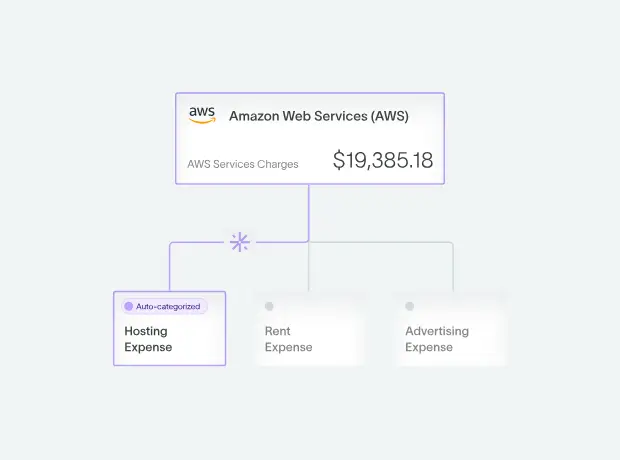
A chart of accounts (CoA) is the complete list of every account in your general ledger, organized by type: current assets, current liabilities, equity, revenue, payroll, expenses, and beyond. For SaaS companies, the standard chart of accounts needs significant customization because subscription revenue, deferred revenue, and SaaS-specific COGS don't fit the default categories in most accounting software. If you're setting one up from scratch, start from our free general ledger template and customize it for SaaS. To understand the difference between a general ledger and chart of accounts read our in depth guide.
What makes a SaaS chart of accounts different
There are four structural differences:
- Revenue needs multiple lines. SaaS companies have subscription revenue, implementation revenue, professional services revenue, and often usage-based revenue. A single "Revenue" account hides the information that investors and board members need.
- Deferred revenue is a major liability. If you're collecting annual prepayments, you need a dedicated Deferred Revenue (Current) account, and eventually a Deferred Revenue (Long-Term) account too. Most default CoAs don't include these. [1]
- COGS determines gross margin. SaaS gross margin is the metric investors scrutinize the most. It depends entirely on which expenses you classify as COGS vs. operating expenses. If you make mistakes in the CoA, your gross margin will be misleading.
- Capitalized software development needs its own home. SaaS companies that capitalize development costs under ASC 350-40 [2] need intangible asset and amortization accounts that don't exist in default templates.
Check out our guide on how SaaS accounting works for more on this.
A complete SaaS chart of accounts template
Let’s look at a complete sample chart of accounts for a SaaS company, organized by account type with standard numbering. This template is made for companies from seed stage through $50M+ ARR, and it’s ready to implement in QuickBooks, Xero, NetSuite, or DualEntry.
Assets (1000-1999)
Liabilities (2000-2999)
Equity (3000-3999)
Revenue (4000-4999)
Cost of Goods Sold (5000-5999)
Operating Expenses (6000-8999)
Revenue account structure: the most important decision

The most important structural decision in your SaaS chart of accounts is how you break out revenue. A single ‘Revenue’ line tells investors nothing. At a minimum, you should separate subscription revenue from professional services revenue. These have different gross margins, different recognition timing, and different growth signals.
Subscription Revenue (4000): Your core SaaS product revenue, recognized ratably. This is the number that drives MRR and ARR. If you get subscription revenue recognition right for a 'pure SaaS' classification, subscription should represent the clear majority of total revenue -- with services and usage as secondary lines.
Implementation Revenue (4100): One-time fees for setup, data migration, and onboarding. This is worth separating because the recognition timing is different (at delivery vs. over time), the margin is much lower than subscription, and investors discount it in valuation.
Professional Services Revenue (4200): For training, consulting, and development. This should be kept separate from implementation. Margins typically run 30–40% vs. 75–85% for subscription.[3] Investors and auditors expect them to be separated. [8] Blending them into one revenue line distorts your gross margin in either direction.
Usage / Overage Revenue (4300): Usage-based or consumption revenue above the subscription base. This should be tracked on its own line in the CoA. In modern SaaS pricing, this category is growing rapidly, driven by broader adoption of usage-based pricing models, [6] so you want to be able to see the trend cleanly.
SaaS COGS: getting gross margin right
Gross margin – one of the primary SaaS metrics investors scrutinize [3] – is determined by what you classify as Cost of Goods Sold. The rule is: if the cost is directly tied to delivering your product to customers, it’s COGS. If it’s about building, selling, or running the company, it’s an operating expense.
Target SaaS gross margins
The healthy range for SaaS subscription gross margin sits between 75% and 85%. [3] If yours comes in below 65%, it's worth reviewing whether R&D or sales costs may have been misclassified into COGS, or whether your model includes higher-than-average infrastructure or services costs. If it's above 90%, it's worth checking whether hosting or support costs have been underclassified. Once your COGS structure is correct, your next step is understanding how gross margin flows into the LTV:CAC ratios investors will scrutinize — our SaaS unit economics guide covers the complete framework.
How the chart of accounts changes by growth stage
Your SaaS chart of accounts should evolve as your company grows. While a seed-stage startup needs 25-40 accounts. [9] In practice, Series A companies typically expand to 50–70 accounts as departmental reporting and investor-grade financials become required; Series B and beyond commonly reach 80–100+ as multi-entity consolidation, ASC 606 revenue segmentation, and audit preparation demand greater granularity. Adding everything at once creates unnecessary complexity; adding too late forces expensive restructuring.
The table below shows what to include at each stage, and which accounting software for growing SaaS businesses tends to work best. Use it as a checklist: if you're approaching the next stage, these are the accounts to layer in before the complexity catches up with you.
Common mistakes
The most frequent SaaS chart of accounts mistakes create problems that compound over time: misleading gross margins, failed audits, and investor-facing P&Ls that don’t match industry standards. Fix these inside your general ledger before they become expensive.
- Using a single "Revenue" account. If an investor can't see subscription revenue separately from services revenue, they can't calculate your SaaS gross margin. This is the number-one sign of an immature CoA.
- Putting sales commissions in COGS. Commissions are a selling expense (7000-series), not a cost of delivering the product. Misclassifying inflates COGS and deflates gross margin. It also flatters the SaaS magic number, since understated S&M shrinks the denominator.
- Having no deferred revenue account. If you're collecting annual prepayments and don't have a deferred revenue liability account, you're recognizing revenue prematurely – cue an audit red flag.
- Making no separation between current and long-term deferred revenue. Multi-year contracts need both. Auditors and investors expect this classification for working-capital analysis.
- Having too many sub-accounts too early. If you’re a seed-stage startup with 150 accounts, you’re wasting time on a level of classification nobody needs yet. Start lean, and add structure as you grow.
- Not aligning with investor reporting expectations. Your P&L should show: Revenue → COGS → Gross Profit → R&D → S&M → G&A → EBITDA. If your CoA doesn't produce this structure naturally, you’ll want to restructure it.
Setting up your SaaS chart of accounts in DualEntry
If you'd rather skip the manual setup entirely, DualEntry automates GL coding and account mapping with AI and generates a SaaS-optimized chart of accounts automatically when you create your company. It includes the revenue breakouts, COGS structure, deferred revenue accounts, and department tracking from the template above – pre-configured with the correct numbering convention.
DualEntry’s pre-built CoA covers subscription, implementation, services, and usage revenue out of the box. COGS is structured for SaaS gross margin, and deferred revenue is split current and long-term from day one. You start with the lean 40-account seed structure, and DualEntry prompts you to add accounts as your complexity grows: from multi-entity sub-accounts to ASC 340-40 commission and departmental tracking. Transactions are auto-categorized to the correct account using AI, not manual rules, which cuts down on misclassifications that inflate or deflate gross margin.
If you're a solo founder tracking fewer than 20 transactions a month, QuickBooks or Xero with a properly configured CoA will work fine. DualEntry is built for scaling SaaS companies whose transaction volume and accounting complexity make manual categorization unsustainable.
The bottom line
Your chart of accounts is the foundation of every financial report your company creates. Get the SaaS-specific structure right – revenue breakouts, COGS classification, deferred revenue – and everything from gross margin to investor P&Ls to audit readiness will be smoother. It’s worth setting these strong foundations, otherwise you’ll find yourself needing to rebuild your CoA later… usually under pressure from auditors.
The template in this guide is easy to adapt to your stage, so try implementing it this week. And if you want it pre-built, DualEntry can generate it for you. Schedule a free demo to see how DualEntry automates the accounting work that slows scaling SaaS teams down — from revenue recognition to month-end close.
SaaS Charts of Accounts FAQs
See the full power of DualEntry in 30 minutes
Woosung Chun
CFO, DualEntry
Woosung Chun is the CFO of DualEntry with experience in corporate finance, accounting, strategy, and acquisitions. He previously grew from scratch and led the M&A and Finance teams at Benitago, where he completed more than 12 acquisitions in 2 years. He graduated with a BS from NYU Stern. At DualEntry, Woosung writes about AI in accounting, revenue recognition, foreign currency accounting, hedge accounting, and ERP modernization for finance teams navigating complex, multi-entity environments.
.webp)