Don't worry! The contents here will appear on the published page.
How to Choose an ERP System: A Step-by-Step Selection Framework

Woosung Chun
CFO, DualEntry
Woosung Chun
CFO, DualEntry
Woosung Chun is the CFO of DualEntry with experience in corporate finance, accounting, strategy, and acquisitions. He previously grew from scratch and led the M&A and Finance teams at Benitago, where he completed more than 12 acquisitions in 2 years. He graduated with a BS from NYU Stern. At DualEntry, Woosung writes about AI in accounting, revenue recognition, foreign currency accounting, hedge accounting, and ERP modernization for finance teams navigating complex, multi-entity environments.
Learn about our editorial policies.
Last updated
September 25, 2026
Reviewed by
Do San (Justin) Myung

Do San (Justin) Myung
Expert Accountant & Former Consulting CFO | DualEntry
Justin (Do San Myung) is Expert Accountant at DualEntry with 20+ years of hands-on experience managing general ledgers, financial close processes, and ERP implementations for mid-market and enterprise companies. As a former Consulting CFO and Controller, he has personally overseen month-end closes, SOX compliance programs, and multi-entity consolidations across technology, manufacturing, and services industries. Justin specializes in transforming manual accounting workflows into automated, AI-driven processes.
Learn about our editorial policies.

Summarize this article
How to choose an ERP system? It's certainly not as easy as going through a generic checklist. ERP selection is a six-figure decision. A typical mid-market implementation runs around $450K (or more)[1] and takes months — and while most organizations land within their planned budget, large IT projects still run about 45% over budget on average, with a minority failing badly enough to threaten the business.[2] Across IT projects broadly, only about a third fully succeed on time, on budget, and in scope.[6]
Instead of making vendor comparison your first to-do, start by questioning whether you need an ERP at all yet. Once you do, skip the broad-strokes guides and work from a selection criteria specific to your team's needs.
To help with decision-making, this guide is for finance leaders who want to know when to switch, what it costs, how to set relevant benchmarks, and how to handle ERP evaluation fairly… looking beyond the fancy demos.
Do you even need an ERP right now?
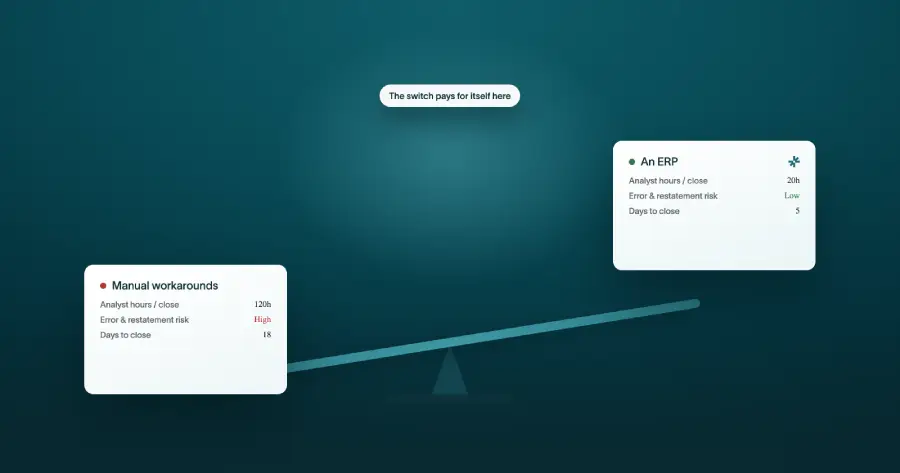
You need an ERP when spreadsheets and starter platforms like QuickBooks can't handle your entities, transaction volume, or reporting anymore. A growing company outpaces QuickBooks when it adds entities, high-volume multi-currency consolidation, or rev-rec complexity. The switch usually happens in the mid-market, when manual workarounds start costing more than the software would.
There are various signals that'll tell you it's time to switch. Maybe you're running multiple entities or currencies and consolidating them by hand. Perhaps your close drags because the numbers live in too many places — close cadence varies enormously, with the slowest quartile of finance teams taking more than twice as long to close as the fastest[5]. Or revenue recognition under ASC 606[4] has outgrown what a spreadsheet can track. Perhaps investors and auditors are asking for reports you can't create quickly.
Also, consider your business' size and growth stage…
Are you ERP-ready? Comparing needs by company stage
For a deeper stage-by-stage breakdown, decision matrix, 3-year TCO model, and vendor shortlist, see our guide to ERP selection by funding stage.
ERP selection, step by step
The ERP selection process runs from confirming you need one through to validating cost and references before you sign. Here are the 6 core steps:
- Confirm you actually need an ERP for your stage
- Assemble the selection team and an executive sponsor
- Document your needs based on your real workflows
- Shortlist vendors that fit those requirements
- Score every vendor demo against a weighted scorecard
- Validate TCO and references before signing
Each step has its own mechanics, but following this order keeps you disciplined. In our experience, a realistic selection timeline is about 3–6 months. If that sounds like too long, rest assured it isn't — compressing it below that range is a common cause of poor fit and buyer's regret.
How to set ERP selection criteria from your finance workflows
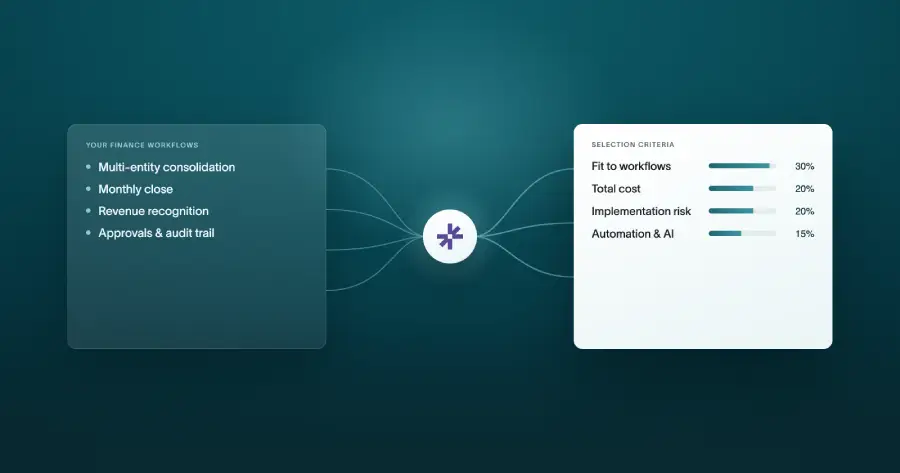
ERP selection should begin with a documented requirements list tied to business goals. Typical goals to consider include multi-entity consolidation, ASC 606 revenue recognition, close speed, audit trail, multi-currency accounting, and reporting. Weight your must-haves before you see a single demo.
Going with the same ten criteria every other buyer uses is a mistake, because these factors probably don't reflect what actually slows your team down. Instead, look at your own monthly close process. Where do things break today? Where might they break a year from now? Consider also factors that generic or outdated decision templates don't cover – think native integrations, automation, and AI.
Separate must-haves from nice-to-haves. Weighting every criterion will help keep you on track later, when a polished demo tempts you to score on feel rather than fit.
ERP must-haves for finance teams
Cloud vs. on-premise vs. hybrid: which deployment to choose?
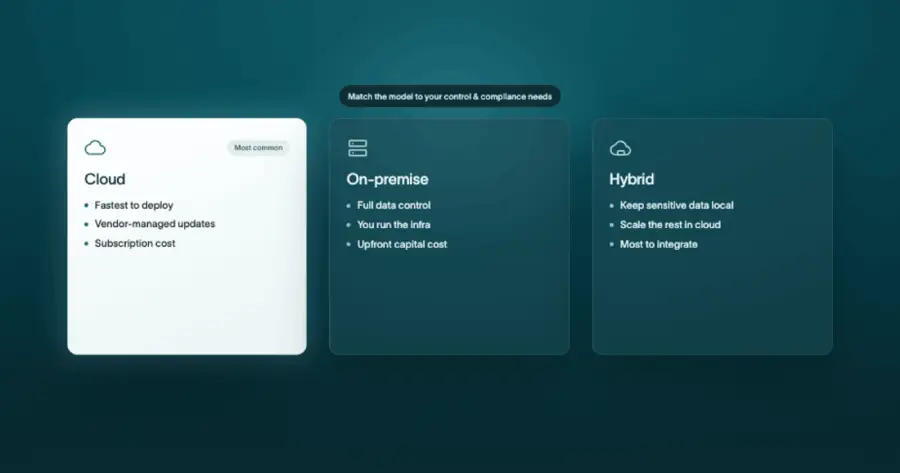
A cloud SaaS ERP lowers upfront cost and IT overhead versus on-premise. It also deploys faster, which is why it's now the default choice for the large majority of organizations selecting new systems.[1] Exceptions exist, but only in very particular cases. On-premise or hybrid platforms make sense when you have strict data-residency requirements, heavy customization needs, or legacy systems you need to integrate with.
ERP deployment models compared
How to evaluate and compare ERP vendors
You should judge vendors by scoring them against a weighted criteria and by going into every demo prepared. Here's how to handle it:
- Run the demo, don't watch it. Give every vendor the same scripted scenarios pulled from your real workflows. When they all solve the same problems, you can compare like for like.
- Score each vendor on your must-haves. A weighted scorecard reduces demo bias in ERP vendor evaluation. You don't want to end up being influenced by whoever presents best.
- Check references and total cost of ownership (TCO). Talk to customers your size, in your industry. Then validate the full quote against the real cost breakdown (more on that in the next section) before you sign anything.
Example of a weighted ERP vendor evaluation scorecard
Uncovering the total cost of ownership
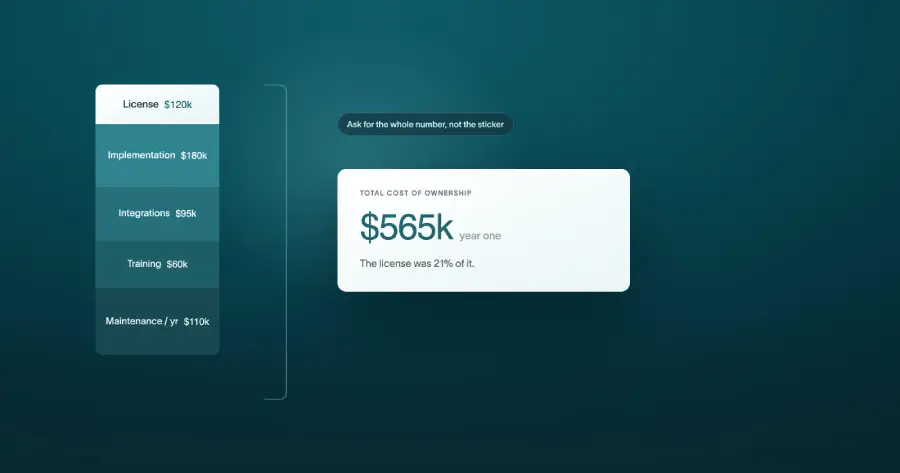
What does an ERP really cost? Total cost of ownership includes implementation, migration, integration, and training – not just a license. All-in, a mid-market ERP typically costs well beyond the license fee once implementation, migration, integration, and training are included, with implementation alone running around $450,000 for mid-market deployments.[1]
Data migration cost is the big one that catches people out – around half of organizations significantly underestimate it.[1] Then there are integrations, which add up quickly across standard connectors (and cost more for complex, real-time ones), and training and change management, which deserve a meaningful share of the budget. For on-premise systems, a common industry rule of thumb puts annual maintenance at roughly 15–20% of the license fee each year after setup; cloud/SaaS subscriptions typically bundle support into the recurring fee.
Training is a number that teams often try to save on – but underinvestment in the people side of a project (training, change management, and adoption) is one of the biggest drivers of ERP underperformance. Prosci's research finds that human (people-side) factors matter roughly 6x more than technical factors in realising ERP benefits.[3] Scrimp on it and you risk stalling adoption, or even the whole investment underperforming.
Some AI-native vendors now offer free implementation, which changes the math for ERP cost considerably you can review DualEntry's pricing before you commit to a quote. You can run your own numbers with the DualEntry ERP cost calculator before committing to a quote.
ERP cost breakdown for mid-market companies (illustrative ranges; implementation median ~$450K per Panorama 2024[1])
An AI-native vs. legacy ERP? The big question in 2026
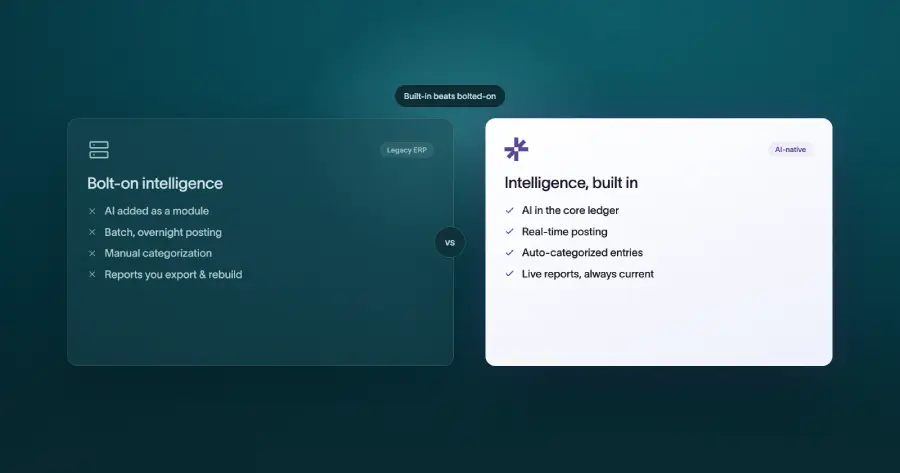
The difference is in the architecture. Legacy ERPs bolt AI on to systems built decades ago. An AI-native ERP automates transaction coding, reconciliation, and close tasks from the ledger up. It's also built around a single source of truth, so the intelligence runs through the core (rather than sitting beside it).
When evaluating what path to go down, score vendors on a few specific things: AI-assisted close and reconciliation, transaction processing, implementation speed, and integration breadth.
The right answer depends on your company stage. An AI-native ERP like DualEntry is built for the mid-market QuickBooks-to-ERP inflection point. Legacy suites can still fit complex global enterprises with heavy customization and deep region-specific needs.
Common ERP selection mistakes
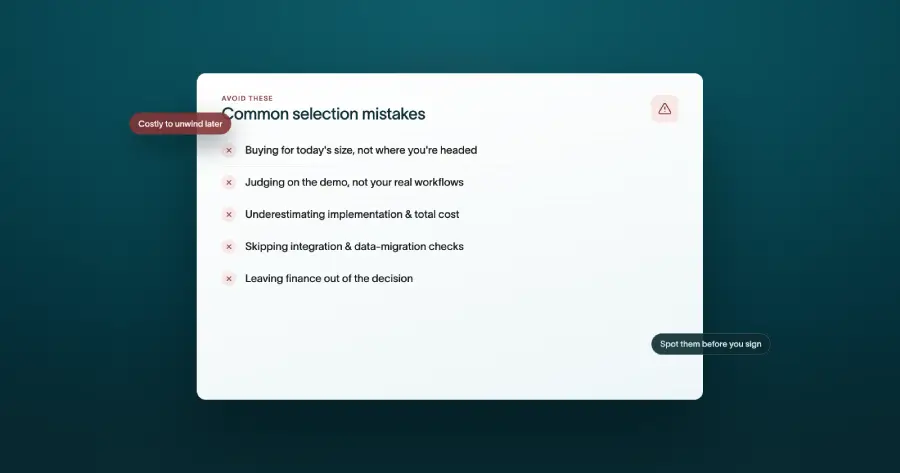
Here's what not to do when making an ERP selection:
- Skipping the “do we need one yet” question and over-buying for your stage
- Writing requirements from a generic template instead of your real workflows
- Letting the slickest demo, not a weighted scorecard, drive the decision
- Budgeting only the license, and underestimating migration and training
- Rushing the timeline. Compressed schedules raise the risk of failure — large IT projects already run roughly 45% over budget and deliver far less value than planned, and the most troubled become “black swans” that threaten the business.[2] Only about a third of IT projects finish fully on time, on budget, and in scope, so squeezing the schedule cuts into an already-thin margin for success.[6]
Summary
Choosing an ERP comes down to four moves: confirm you actually need one, set your criteria from your close, compare vendors on a weighted scorecard, and validate the true total cost of ownership before you sign anything.
Don't be swayed by huge feature lists. The right ERP is the one that meets you where you're at, can grow with you, and reconciles cleanly to your financials.
If you're ready to upgrade your starter accounting system and handle more accounting complexity in an ERP, DualEntry is the AI-native choice for ambitious businesses. Compare it to NetSuite, or schedule a demo to see how automated accounting handles your close, reconciliation, and reporting out of the box.
How to Choose an ERP FAQs
See the full power of DualEntry in 30 minutes
Woosung Chun
CFO, DualEntry
Woosung Chun is the CFO of DualEntry with experience in corporate finance, accounting, strategy, and acquisitions. He previously grew from scratch and led the M&A and Finance teams at Benitago, where he completed more than 12 acquisitions in 2 years. He graduated with a BS from NYU Stern. At DualEntry, Woosung writes about AI in accounting, revenue recognition, foreign currency accounting, hedge accounting, and ERP modernization for finance teams navigating complex, multi-entity environments.