

Puma: An Autonomous Resolver in Our Workbench

About a year ago, we started exploring agentic tooling seriously. Our team mostly used these tools to move faster and hand off the boring parts, while leaving the actual thinking to the engineer.
That worked well, but it also created a new problem: the more code our agents generated, the more code somebody had to read, and review started becoming the bottleneck.
We trust each other as a team. We don’t trust AI enough to delegate our thinking to it, and we never will. Our internal motto is simple: you own what you ship, from the first line of code to the moment you merge on a green CI.
So if agents were going to help us write more code, we needed a way for review to keep pace without giving up that ownership.
I started spending weekends experimenting with the first pieces of what became our review layer. At first, it was just a prompt. Every PR opened during that period got two reviews from me: a manual one and an automated one.
The automated review kept catching things a human reviewer could easily overlook. From there, I built a simple, good-enough interface to absorb some of the load from the never-ending stream of pull requests our team was opening.
We called it Puma.
Why Puma exists
We looked for something off the shelf first. We didn’t want to build this unless we had to.
Everything we tried fell short on one of two axes: cost or fit. The vendor products were priced for a volume we couldn’t justify. BugBot was the clearest example, and eventually the reason we moved away from it, because the cost didn’t scale linearly.
The self-hosted options came with an opinion about how you should work – adopting the tool also meant adopting its workflow, but we already had a workflow that worked for us. We went through the open-source options too.
By the end of that search, there were four things we knew we needed, and none of the options did all four:
Together, those requirements describe a workflow that’s specific to how we work, but one we can keep adapting with new skills, connectors, and release workflows.
The three rules
Those choices sit on top of three guidelines we use as a team:
Puma is built around those rules, with a human always in the loop. That’s the north star.
We don’t care about being able to say that “our agent ships X% of our code.” An agent will never understand what a customer wants as well as the experience and expertise of the person doing the work.
When it stopped being a side project
I didn’t realize how much I relied on Puma until the day it went down and my review queue grew to almost 20 PRs.
That was the signal to invest. I reshaped the architecture into something production-grade. Around the same time, Ramp Inspect showed up, and funny enough, the architecture resembled ours, with a few fundamental differences.
From there, Puma kept growing. We added exception review, Linear ticket review, a chat interface, and a Slack path where anyone could request a review on demand. Eventually, the entire engineering team was using it to decide whether to merge.
Today, that architecture is what lets us grow the team linearly while still shipping almost two releases a day.
Structure
Puma is modular enough that anyone can contribute to a single layer without touching the rest:
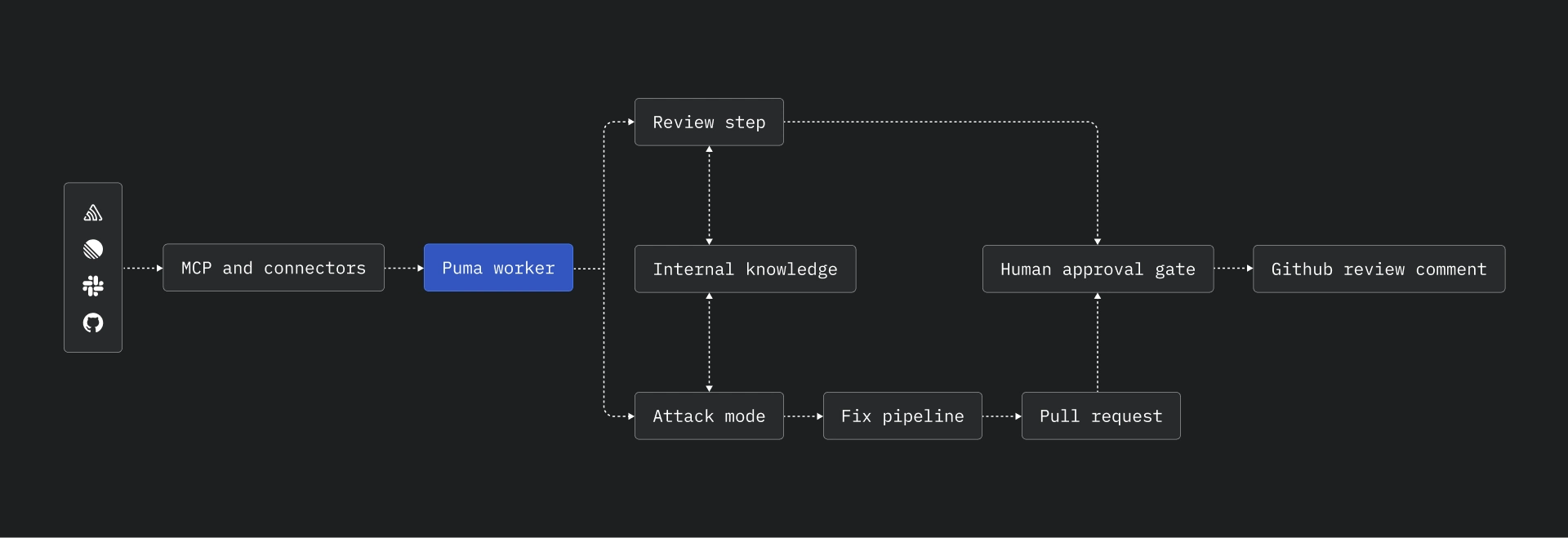
The review step is a seven-stage process covering code style, patterns, code congruency across modules, cyclomatic complexity, and similar signals.
The agentic step is an N-agent tier structure where we spawn whatever we need to mitigate an issue. This is Attack mode, and it’s probably the part of Puma people underestimate most.
MCP and connectors plug external tools into the Puma ecosystem, while internal knowledge keeps track of known issues and previous fixes so we don’t end up solving the same problem twice with three different implementations.
One design decision worth calling out: steps (1) and (2) are not interconnected. That’s deliberate. We usually decide whether a PR is worth revisiting before doing anything else; if it’s slop, we just close it.
How a review actually runs
Puma can be triggered from Slack, chat, the dashboard, or the autonomous review bot, and each one feeds into the same review pipeline.
1. Sandbox
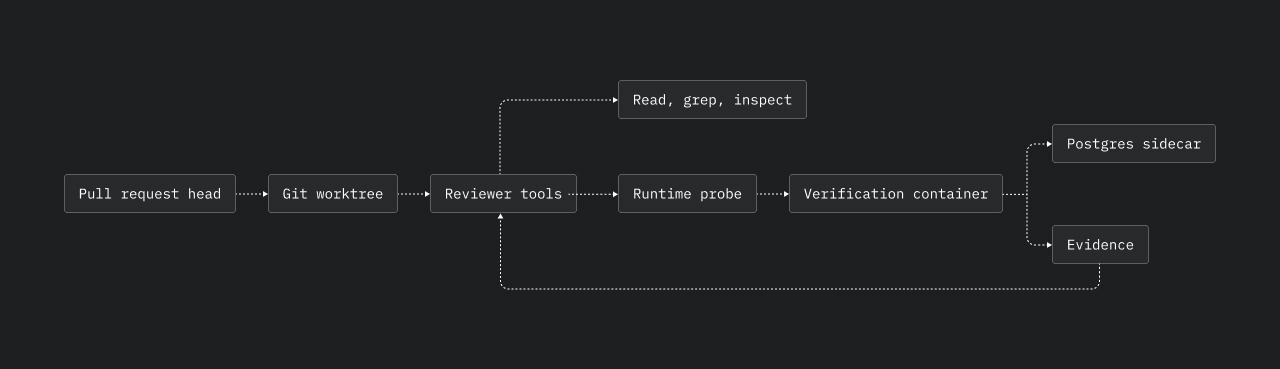
Puma checks out the PR head into an isolated git worktree, so the reviewer reads the real branch rather than a detached patch. When runtime evidence matters, Puma starts a short-lived verification container with a Postgres sidecar, runs the probe there, and tears it down afterwards.
2. Retrieval
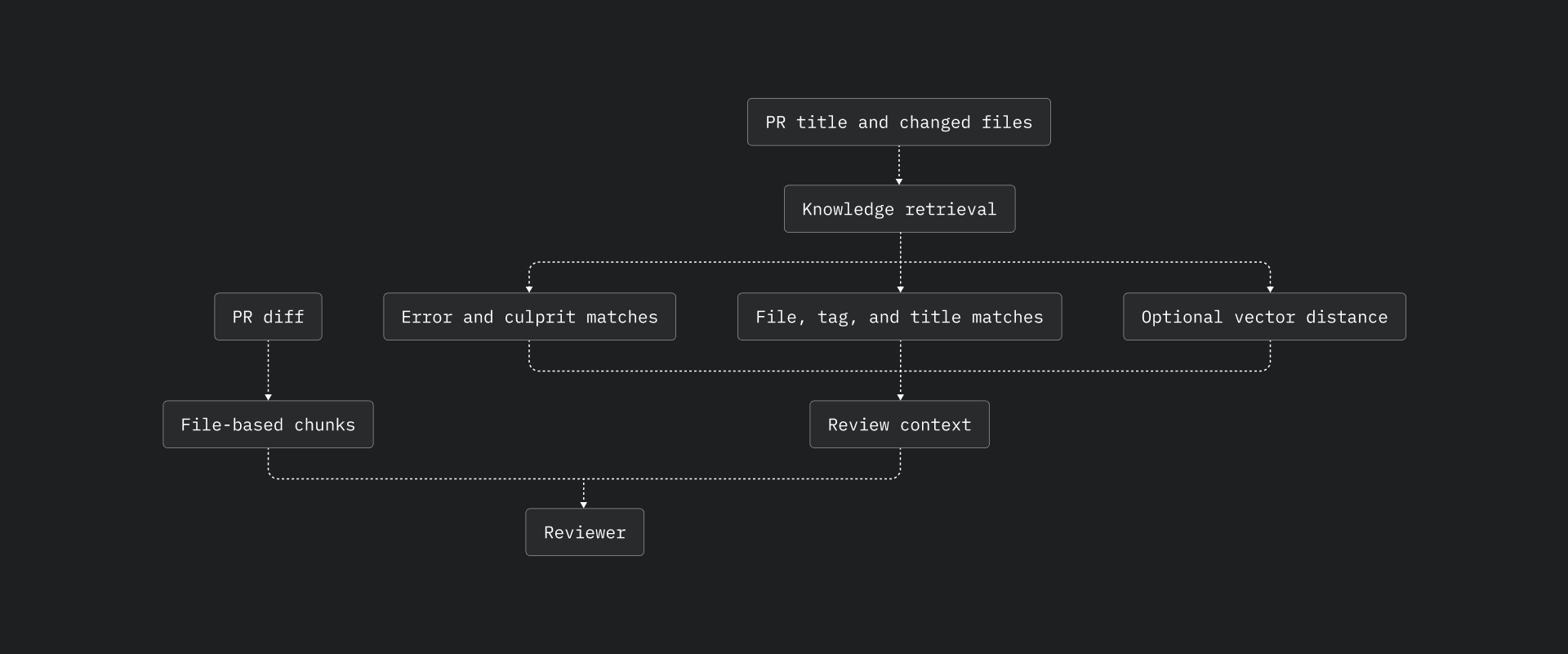
Puma indexes the knowledge around the codebase, including prior fixes, failed attempts, negative learnings, derived rules, and review patterns. Large PRs are split by file once they cross 2,000 changed lines. Each review gets the diff, the checked-out branch, and the relevant slice of internal knowledge rather than the entire repository.
3. The seven steps
Each stage runs as a separate pass with its own prompt and gate:
Human approval is the final gate. Nothing gets posted until someone sends it.
4. Model routing
We run a mixture of experts, but at the application level rather than the model level. Each step declares the lane it needs: a cheap review lane, a separate critic lane, a stronger architecture-judgment lane, a default fix lane, and smaller maintenance lanes for comments, CI, simplification, chat, and commit titles.
This is also where the cost story comes from. The high-volume, low-judgment passes run on a cheap, fast model, while the stronger model only sees what survives the earlier gates. Routing everything through a frontier model gets you a bill like BugBot’s. Routing by step gets you ours.
Puma computes spend from token counts and per-model pricing, stores it alongside fix attempts, and exposes it in the metrics dashboard. Cost control isn’t a budget cap bolted on afterwards; it comes from the routing itself.
5. Output
Puma comments on the PR. Reviews are attributed to you, not to the bot, so ownership stays where rule #1 says it belongs.
Attack mode: Autonomous error resolution
Review is defensive. Attack mode does the opposite: Puma goes looking for work to do.
The inputs come from our connectors. Sentry gives us the issue and, in most cases, the stack trace. Linear adds the ticket context, while Datadog sits on the operating side as telemetry rather than an Attack input.
From there, the main loop works through unresolved Sentry issues, filters out duplicate work, scores difficulty, and attacks the easier fixes first.
.jpg)
That’s what makes autonomous resolution tractable. The hard part of fixing a production bug is almost never writing the patch; it’s reproducing the issue and knowing which of the forty exceptions in your dashboard actually matters. Puma handles that part first.
Once an issue is triaged, Puma runs it through the fix pipeline: worktree, prompt, agent execution, change detection, git operations, Docker verification, optional simplification, optional architecture alignment, and push. Then it opens a pull request and stops at the human gate.
Attack mode is autonomous up to the point where somebody has to own the change. It doesn’t push to main nor auto-merge on green. The agent does the work, but an engineer still takes responsibility for it. Rule #2 doesn’t get an exception just because the author was a machine.
Attack mode PRs aren’t fed back into the staged review pipeline by the fix runner. They land as normal pull requests, labelled with their source. From there the same human review surface or autonomous review-bot policy treats them like any other PR.
Every resolved issue and its fix also goes into the embedding store, so when the same class of exception shows up again, Puma can match it against something we’ve already shipped instead of producing a fresh, slightly different implementation.
Matching happens in two layers. The knowledge layer ranks entries using signals like error type, suffix match, culprit basename, file overlap, tag overlap, title match, description match, confidence, and optional vector distance. The duplicate guard computes a normalized signature from the title, error type, and culprit, and combines token overlap with optional vector distance against recent fixes.
In one weekend, Puma resolved almost 100 bugs automatically.
One curious thing happened when we were shutting down Cursor’s BugBot. One of its reviews found zero bugs on a PR. Puma attacked the same PR, and BugBot magically found the same issues right after.
The interface
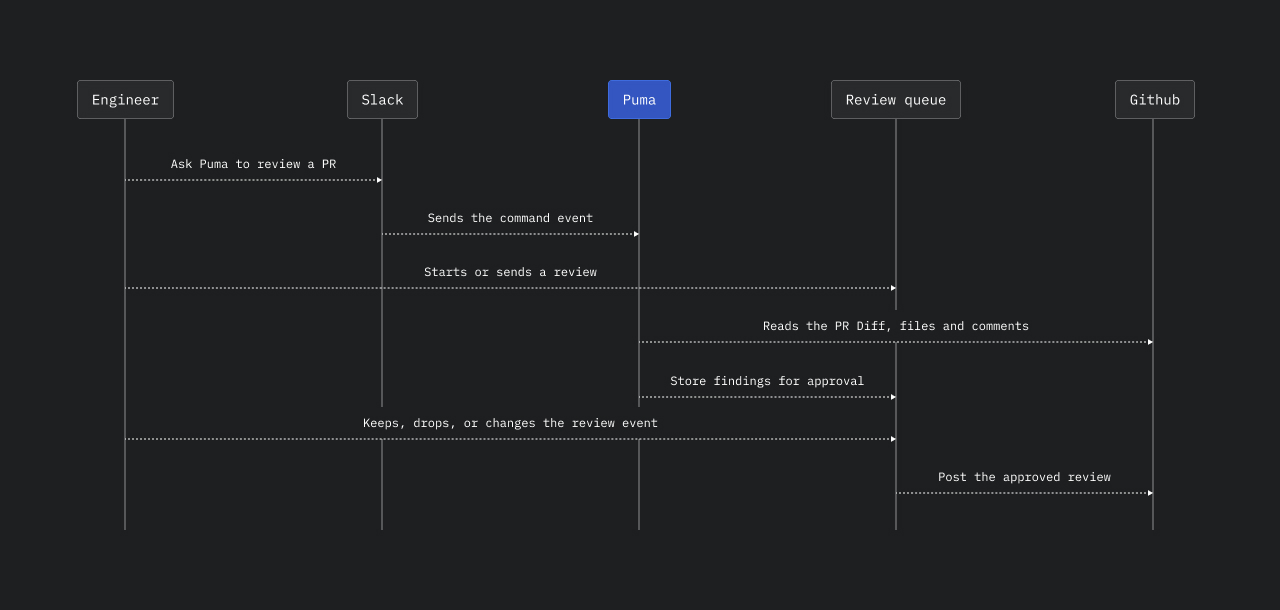
Puma has two review surfaces: a pull request queue and Slack on-demand commands. Findings wait for approval before posting, so an engineer can send everything, drop noise, approve the PR, or request changes.
A posted comment follows a consistent shape: what breaks, the proposed fix, optional context, and a small footer with severity and category.
Where we are
Today, Puma reviews and comments on 100% of the code.
We also run an autonomous review bot on our frontend repository. It uses the same harness, but the workflow is different: you don’t request a review. It happens automatically, and the review is assigned to the bot.
We require engineers to attach artifacts to every pull request as proof that they understand how to use the feature, that the bug is actually fixed, or that the CLI they’re working on behaves as expected. Puma checks those requirements, the tests, and the rest of the change.
The result is that we can keep growing the team, spend more of our thinking on the things that matter, and deploy to production twice a day knowing every change has been reviewed by an agent that knows our codebase and escalates when something looks wrong.
Cost
We eventually migrated off Cursor’s BugBot because it stopped making sense economically. At our volume, it was costing us close to $8K a month, while Puma costs around $500 for a team of 40 engineers.
The problem wasn’t quality. BugBot caught real issues. The problem was that cost scaled with the thing we were trying to increase. Every extra PR added to the bill, which meant the faster the team moved, the more we paid to keep up with it. In practice, we were taxing our own velocity.
Once we plotted cost per PR against what the reviews actually caught, the math was obvious. Most flagged items were things our linters, type checker, and tests already covered. The genuinely useful catches, like logic errors and unsafe migrations, were a minority, and there was no way to pay only for those.
Puma inverts that. The monthly cost is roughly flat, so nobody thinks twice about running it on a small PR. At around $12.50 per engineer per month, the economics stay about the same whether we merge 200 PRs a week or 600.
Where this goes
Puma changed how our engineers work almost overnight. They ship fast because they trust there’s a layer of defense at every step, catching the things they miss.
The broader point is that this is the moment to build tools that make your workflow replicable, not tools that replace you. Commit to an idea, spend a bit of time on it, and prove it right.
Other solutions out there are similar to Puma on paper. But Puma knows our internal patterns and infrastructure well enough that migrating to anything else doesn’t make sense for us right now.
Maybe we’ll release Puma in the wild eventually and let everyone else assess it. For now, it helps us deliver close to 1,500 PRs a month.
Want to build the future of ERP?
Join the team building a modern ERP for companies that have outgrown the old way of doing finance.