Introducing the DualEntry MCP Server: Your Ledger, Now Operable by AI

Jan Abaza
Founding Product Marketing Manager, DualEntry
Jan Abaza
Founding Product Marketing Manager, DualEntry

Jan Abaza is the Founding PMM at DualEntry, where she shapes how the product is positioned for finance leaders moving off legacy ERPs. Her background spans product, design, and go-to-market, which gives her a practical read on what mid-market finance teams actually need. She holds an MBA from the University of Illinois Urbana-Champaign.
Learn about our editorial policies.
Last updated
June 24, 2026
Reviewed by

Learn about our editorial policies.
dualentry_mcp_announcement
Contents
More

Subscribe to the
DualEntry Newsletter

Get Fresh Al finance insights, reports and more delivered straight to your inbox

Thank you! Your submission has been received!
Oops! Something went wrong while submitting the form.
Summarize this article
Introducing · DualEntry MCP Server

Your ledger, now something you can talk to.

Connect Claude, Cursor, or any MCP client to your DualEntry data. Ask questions in plain English, then draft the entries to act on them, all gated by the same permissions as your dashboard.

claude · dualentry
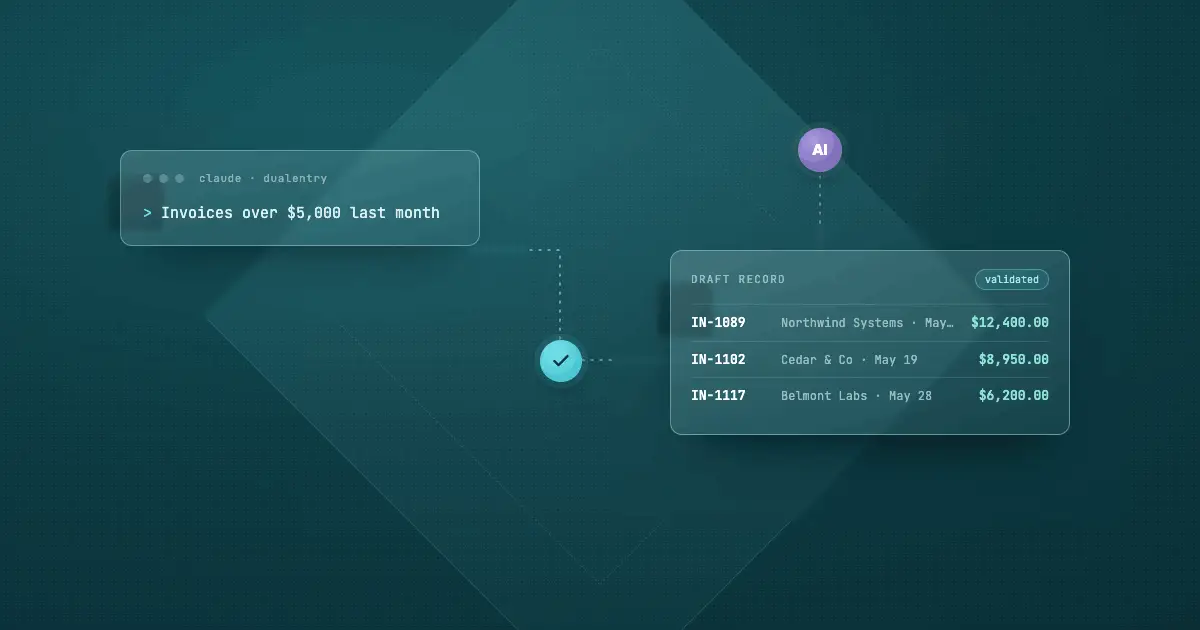
> Show me all invoices from last month over $5,000, then draft a bill for Acme Corp for $500 of office supplies.
Found 3 invoices over $5,000 in May:
IN-1089Northwind Systems · May 12$12,400.00 IN-1102Cedar & Co · May 19$8,950.00 IN-1117Belmont Labs · May 28$6,200.00
8 read tools · search_records
Drafted a bill for Acme Corp — $500.00, Office Supplies. Validated against your chart of accounts. Nothing is posted until you approve.
5 write tools · create_draft_record → validate_record → save_record
Same data. Same rules.

Not a copy of your books. Your books.

The MCP server works against your live DualEntry data, governed by the same permissions as the dashboard. There is nothing to sync and nothing to install.

One connected model

Entities, books, periods, transactions

Customers tie to invoices, invoices tie to payments, journal entries tie to accounts. The assistant reads the relationships, not isolated rows, so a question and its follow-up resolve in a single conversation.

Role-based access

Permissions you already set

Every tool checks your DualEntry role before it returns anything. If you cannot see a company, vendor, or transaction in the dashboard, you cannot see it through MCP either.

Remote & hosted

One URL, browser sign-in

Streamable HTTP transport and OAuth 2.1. No API keys to mint, rotate, or leak. Point your client at the server and sign in with the credentials you already use.

What's included

Thirteen tools, in two jobs: ask and act.

Most accounting connectors stop at read-only. DualEntry's does the second half too, with a draft-first flow so nothing reaches your books by accident.

Ask · 8 read tools

Answers from your live ledger

Search, retrieve, trace, and inspect any record or entity, with pagination up to 1,000 results per page.

  • search_recordsFilter by type, vendor, customer, date, or amount
  • get_record_detailFull detail for a transaction by ID
  • get_record_by_numberLook up by number, e.g. JE-123, IN-789
  • get_record_historyThe audit trail for a record
  • get_related_recordsPayments linked to an invoice, and more
  • get_record_schemaThe field schema for a record type
  • list_supported_transactionsEvery record type, and what's creatable
  • search_entitiesVendors, customers, accounts, companies, items, classifications, terms
Act · 5 write tools

Drafts you review before they post

The assistant proposes a record, validates it, and only writes when you say so. Every step still respects your role.

  • create_draft_recordBuild a record for review; nothing saved yet
  • validate_recordCheck required fields, entities, and balancing
  • save_recordCommit the record to the database
  • create_draft_entityDraft a vendor, customer, or other entity
  • save_entitySave the new entity once it's confirmed
draftvalidateyou approvesave
Who it's for

Finance asks. Engineering builds. Both skip the dashboard.

01

Finance & accounting

Look up records, trace what's linked to them, and draft entries in plain language during the close, without building a report or clicking through screens.

02

FP&A & RevOps

Interrogate revenue, AR, and AP across entities from the tool you already think in, with the relationships intact instead of stitched together by hand.

03

Engineering

Investigate, debug, and prototype against real accounting data from Claude Code or Cursor, before writing a line against the REST API.

Get started

Connect in about a minute.

Add one server URL to your client and sign in. The first time you use a tool, your client opens a browser to authenticate.

https://api.dualentry.com/mcp/ Streamable HTTP · OAuth 2.1 · no API keys
Claude.ai Claude Code Cursor VS Code OpenAI Codex Any MCP client

In Claude, open Settings → Connectors → Add custom connector and paste the URL. In Cursor, use the one-click install button in the docs. Custom connectors on Claude require a Pro, Max, Team, or Enterprise plan.

Stop describing what you need. Just ask for it.

No exports. No report builder. No one-off scripts.
A question, an answer, and a draft you can post.

See the full power of DualEntry in 30 minutes

Go live in 24 hours

By clicking "Schedule Demo" you agree to the use of your data in accordance with DualEntry's Privacy Notice, including for marketing purposes.